Monday, July 2, 2012

Regions in Javascript files and other addons for VS2010

Dear Readers,

I was looking for a free tool to create regions in Javascript files so that we could be able to make it more structured and readable. I have finding that can help us.

1. JavaScript Editor
2. Code Maid (Great Tool to help Devlopers)

 JavaScript Editor:
 JavaScript Editor by default adds regions to method


but if we have aim to
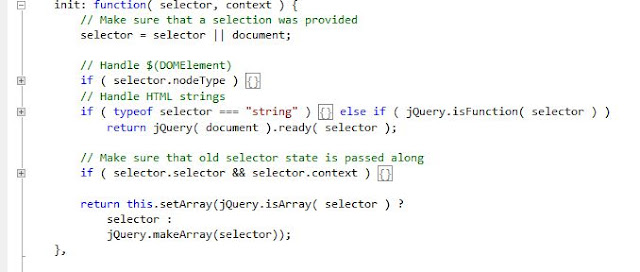


You can see the JavaScript Editor's auto implementation adds regions with every block based on
braces used to open and close a block of code.

Now if we have to add region based on set of method use following way:
 // abc-xyzblock
{
function abc(){
// to do code
}

function abc2(){
// to do code
} 

function xyz(){
// to do code
}
}


after collapsing block 


Now as we can see it very easy to identify our javascript code in blocks


CodeMaid:

CodeMaid is an open source Visual Studio extension to cleanup, dig through and simplify our C#, C++, XAML, XML, ASP, HTML, CSS and JavaScript coding.

For this add-on everything is available on above provided link so i am explaining it here. Please use link to get detailed information about this add-on I am truly say you are going to love it.


Happy Living....
Happy Concepts....
Happy Programming....

Thanks 
Yashpal Sharma


Tuesday, May 22, 2012

Intellisense in Visual Studio 2010


This is very simple to get jQuery Intellisense in visual studio JS file. Steps include very easy instruction.
1. Drag jQuery-1.4.1.js from SolutionExplorer of project to top of the JS file.
image
When you will start using $(document).ready( ) you will be able to get function parameter and other things.
image
image

Happy Living……..
Happy Coding……….
Happy Concepts……….

Friday, May 4, 2012

Access denied by caller on call of cally

Access denied by caller on call of Cally

I got this issue while i was trying to access parent pages tags into child.

scenario : Both pages exist in different folder. Folder may be readonly.

so if we will try to get properties of parent page that exists in differnt folder then we might need to check readonly access of file , some its on page level or folder level.
JUST by removing the readonly access of file/folder we will be able to remove the error.

Happy Coding...
Happy Concepts...
Happy Programming ...


Thursday, April 26, 2012

Working with HTML Tags

Textbox:

To set width use , Style="width:100px;"


Wednesday, March 21, 2012

submit large amount of data with jquery.post() or $.post()

There is  a limit assoicated with form key collection, and we can increase this limit by setting configuration values in web.config in our application

<appSettings>

        <add key="aspnet:MaxHttpCollectionKeys" value="50000"/>
</appSettings>

We can use this settings to reset data upload restriction implemented by IIS.
This is one of reason when we fail to submit data to server if there is large amount of data is associated with our Page.


Happy Living...
Happy Coding....
Happy Concepts....

Monday, March 5, 2012

Export HTML to Image or PDF

Export HTML to Image or PDF

A few days back one of my friend asked to me How can we export HTML page into Pdf.
We searched a lot there are a large number of thired party tools are available to do this but these
all tools are paid. So we cant buy a tool and because it also include Html reandring engine code so its
not easy to create a tool for project its time consuming task.

As i told you above we are not able to export HTML to Pdf we used a differnt approach to resolve it.
We planned to convert HTML to Image and then write down this image into Pdf and it working for us.

Now i am going to explain it Step by Step:

1. Get reference of System.UI.Form , System.Drawing
2. Create object of WebBrowser
3. On Completed event

    a) Create Bitmap object and specify size of Bitmap
    b) Convert WebBrowser to Control and then use DrawToImage()
    c) Save Bitmap to jpg file.
   
4. Add Reference of iTextSharp
5. Create a Object of Document
6. Create a Object of PdfWriter
7. Add Image to PdfWriter using PdfWriter.Add();
8. Close PdfWriter and Document Object.

Happy Living...
Happy Coding...
Happy Concepts...


Saturday, March 3, 2012

Merge to Update / Insert using a single statement


My best guess is that you can use Merge to Update / Insert using a single statement

-- Merge Statement
MERGE ProjectDetailsTransit  AS spdt1
    USING (select d.ProjectDetailsTransitID,d.Startdate ,d.enddate from DeletedDayInclude d) AS ddi
    ON spdt1.ProjectDetailsTransitID = ddi.ProjectDetailsTransitID
    WHEN MATCHED THEN UPDATE SET spdt1.startDatetime =ddi.startDate, spdt1.FinishDateTime = ddi.enddate
    WHEN NOT MATCHED THEN INSERT(startDatetime ,FinishDateTime )    VALUES(ddi.startDate,ddi.enddate );
GO

Note : In insert statement of  Merge we can not use alias name with fields for ex:
INSERT(stm.User_Id ,stm.Favorite_question )
VALUES(sd.User_Id ,(cast(@questionid as varchar(50)))

if we will write it in the way it defined into blue marked code it will give us following error :
Error 1:  The insert column list used in the MERGE statement cannot contain multi-part identifiers. Use single part identifiers instead.

Because Query parse looks for column name in target table and it densest expect any other table name. So if we will write the alias table name with column name then it will try to find "stm.User_Id" name in columns of target table,but it wont find it there we will get above error message.

 Error 2:   Sometime we get following error if we try to execute newly build sp in which we have used Merge statement:
Msg 325, Level 15, State 1, Line 7
Incorrect syntax near . You may need to set the compatibility level of the current database to a higher value to enable this feature. See help for the stored procedure sp_dbcmptlevel.

 Reason :  

Mostly with each new version of sql server we upgrade our data base and this is very true for application build several year back. In this case, the new functionality get issues to execute because still we are running database on compatibility mode of old version and it is not Compatible with new version of sqlserver for eg.
Compatibility mode is 90 for sqlserver 2005 
and Compatibility mode is 100 for sqlserver 2008


Change the database compatibility level using following command.
For SQL Server 2005:
EXEC sp_dbcmptlevel 'DatabaseName', 90
For SQL Server 2008:
EXEC sp_dbcmptlevel 'DatabaseName', 100


Happy Living...
Happy Coding...
Happy Concepts...